Taming AI-Assisted Code with Deterministic Workflows
Contrary to vibe coding, usually defined as irresponsible running of LLM generated code with no real code review, leading to security, debugging and maintenance nightmares, "vibe engineering" was defined as "iterating with coding agents to produce production-quality code".
Here is how deterministic workflow engines, and specifically Obelisk, can help with the transition.
Deep understanding through replay, time traveling debugging, interactive workflow execution
The most powerful feature of Obelisk is the deterministic nature of its workflows. This means that given the same inputs (including its child execution results), a workflow will always follow the same execution path and produce the same output. How does it achieve this, and why is it so beneficial?
-
The workflow execution happens inside a WASM runtime, isolated from the sources of nondeterminism.
-
Every child execution (parameters, return value) and stateful action is stored in an immutable execution log. This creates a complete, auditable trail of the workflow's journey.
-
Replay: With the log, you can replay any past workflow execution exactly as it happened. This is invaluable for understanding exactly why a particular outcome occurred.
-
Time Travel-like Debugging: As the workflow makes progress, it captures a backtrace on every step. This can cut down debugging time and effort compared to trying to recreate elusive bugs in non-deterministic systems.
In the future, Obelisk will allow more features like interactive step-by-step execution with a possibility to approve each step and even mock return values on the fly.
Sandboxed Activities
With Obelisk, each function isn't just a callable piece of code; it's an isolated entity running within its own virtual machine. This provides critical separation, preventing LLM generated code in one activity from impacting others.
-
Scoped Secrets: Secrets (API keys, credentials, etc.) are strictly scoped per activity, which are usually tied to a single HTTP service. This minimizes the blast radius of a compromise.
-
Resource Limits: Each activity operates within predefined resource constraints (execution time, memory). Even
panics are confined within the activity, and transformed to an execution failure error, which must be handled by the parent workflow. -
I/O Access Limits: Granular control over I/O operations means activities can only interact with approved resources. Disk IO and the Process API are disabled by default.
The robust sandboxing is the antithesis to the dangers of vibe coding, where unrestricted access can lead to chaos. Obelisk enforces a disciplined environment, where every piece of work happens in a contained, auditable space.
Unskippable cleanups for safe experiments
As already mentioned, all possible errors including OOMs, panics, execution timeouts are transormed into an error that must be handled by the parent workflow, making it obvious when clean-up or other compensating logic needs to kick in.
Case study: "Vibe engineering" a Fly.io orchestrator
I thought it would be interesting to see how much does an LLM help when creating a non-trivial workflow. I have set the following goal: Create an Obelisk workflow that deploys an Obelisk app on Fly.io. Currently there are just two Obelisk Apps on GitHub:
- Stargazers app
- The deployer itself
So we should be able to use the deployer to deploy itself (and over again).
Fly.io Activity
Writing an activity for interacting with Fly.io by hand feels a bit boring but also overwhelming.
There are many open-source repos in various languages, Stack Overflow questions and blogs about this
topic, even an unofficial Rust crate
fly-rs. However, it does not
support the WASM Component
Model.
An LLM should be able to generate what is essentially an HTTP client wrapper.
I prefer a schema-first approach, defining the functions and types that I want to use. In the WASM Component Model, the schema language is WIT, and it can look like this:
interface apps {

    record app {
        name: string,
        id: string,
    }
    get: func(app-name: string) -> result<option<app>, string>;

    put: func(org-slug: string, app-name: string) -> result<app, string>;

    %list: func(org-slug: string) -> result<list<app>, string>;

    delete: func(app-name: string, force: bool) -> result<_, string>;
}
Then, looking at the official Fly.io documentation, I created similar interfaces for VMs, IPs, volumes etc. I've implemented one of the activity functions and provided it as an example code to Gemini 2.5 Pro. The process was definetly not a one-shot prompt but the LLM gave me a skeleton to work with. Even though some functions didn't work correctly, mostly due to serialization issues, it was straightforward to check the HTTP status codes and errors from the Obelisk web console and either fix the issues manually or let the LLM fix it.
Deployer Workflow
Once I finished the activity, I started working on a workflow that would do a bit more than a
regular fly deploy. Namely:
- Create a MinIO VM
- Create a volume, populated using a temporary VM
- Set up IPs, port forwarding, secrets etc.
- Create a "final" VM with the Obelisk server configured using the supplied parameters and Litestream replication to the MinIO VM
- Perform health checks
- Run a cleanup routine if things fail or time out
The WIT signature of the workflow function looks like this:
interface workflow {
    app-init: func(
        org-slug: string,
        app-name: string,
        obelisk-config: obelisk-config,
        app-init-config: app-init-config,
        ) -> result<_, app-init-error>;
}
I've broken this into several smaller workflow functions: prepare, wait-for-secrets,
start-final-vm, wait-for-health-check. The main app-init simply calls these child workflows
and performs Fly App deletion on an error. Calling those functions indirectly as child workflows is
not only panic safe, but also allows invoking each step manually.
As for the LLM assistance, Gemini is able to generate mostly correct workflow code when primed with
an example. However, I've used it mostly for the boring parts, like TOML serialization and support
bash scripting. Workflow functions are easy to write (the Rust bindings are generated from WIT using
wit-bindgen) and
honestly, writing the code was more fun than writing a prompt.
Here is an example of a failed execution when the TOML serialization failed: 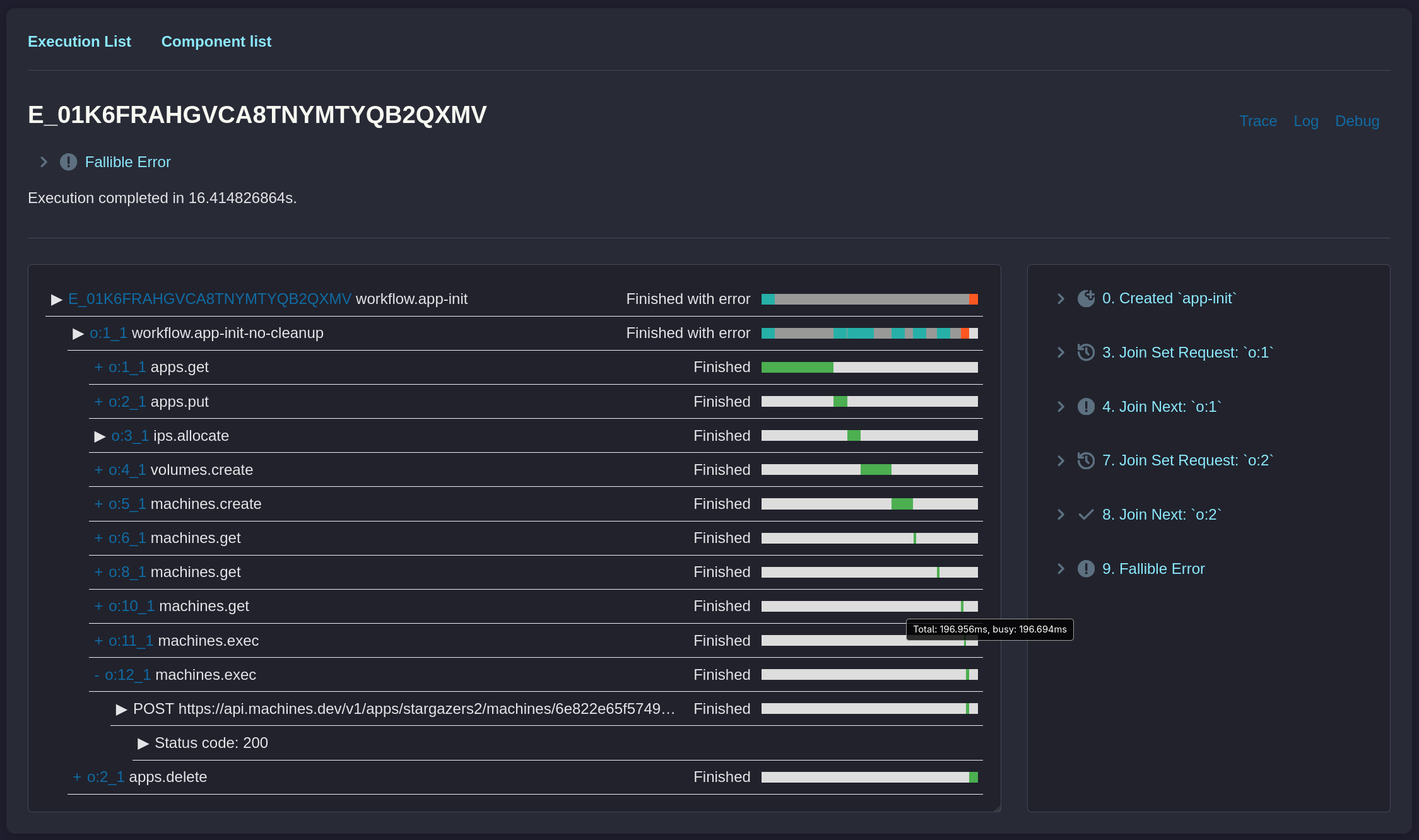
The root execution failed:
"cleanup-ok"OK that worked, but why did it fail? Luckily we can investigate:
- each event is points back to the source code,
- each (child) execution saves its parameters and return value,
- each activity collects its HTTP traces,
- as a last resort, the workflow could be replayed with added logging statements
Drilling down into the child executions reveals the underlying error:
{
  "volume-write-error": "cannot verify config - ExecResponse { exit-code: Some(1), exit-signal: Some(0), stderr: Some(\"Error: missing field `location` for key `activity_wasm[0]`\\n\"), stdout: Some(\"\") }"
}
Passing this information back into the prompt was enough to fix the issue.