Obelisk 0.37: JavaScript, Deployments, Cron
Obelisk 0.37 ships first-class JavaScript support for all three component types — activities, workflows, and webhook endpoints — running inside a fine-grained permission sandbox. It also introduces the Deployment concept with hot redeploy, and built-in cron scheduling.
Since the 0.35 announcement, releases 0.36 through 0.37 have landed with major new capabilities.
JavaScript Components
Obelisk has had experimental JavaScript support since early on, but it worked by compiling JS into a WASM binary using ComponentizeJS, which bundles the StarlingMonkey JS engine inside the component. As explored in the Comparing Rust, JavaScript and Go post, this approach worked, but produced binaries of 10 MB or more and required a Node.js build pipeline to generate them.
0.37 adds a native JS runtime built into Obelisk itself. JS components are plain .js files with no
build step, no bundler, and no WASM toolchain involved. Each component type has a dedicated section
in the docs:
- JS Activities — side-effectful work with automatic retry, outbound HTTP, and environment variables
- JS Workflows — deterministic orchestration with durable sleep, parallel join sets, and stub support
- JS Webhooks — HTTP handlers that can spawn and query child executions
An activity that fetches the current weather for a city looks like this:
// ffqn: myapp:weather/activity.get-temperature(city: string) -> result<string, string>
export default async function get_temperature(city) {
  const resp = await fetch(`https://wttr.in/${encodeURIComponent(city)}?format=%t`);
  if (!resp.ok) throw `HTTP ${resp.status}`;
  return (await resp.text()).trim();
}
The corresponding deployment entry declares the outbound host the activity is allowed to reach:
[[activity_js]]
name        = "weather_activity"
location    = "./activity/weather.js"
ffqn        = "myapp:weather/activity.get-temperature"
params      = [{ name = "city", type = "string" }]
return_type = "result<string, string>"
[[activity_js.allowed_host]]
pattern = "https://wttr.in"
methods = ["GET"]
And a workflow that fetches the weather for several cities in parallel:
// ffqn: myapp:weather/workflow.city-temperatures(cities: list<string>) -> result<string, string>
export default function city_temperatures(cities) {
  const handles = cities.map((city) => {
    const joinSet = obelisk.createJoinSet({ name: sanitizeJoinSetName(city) });
    const execId = joinSet.submit("myapp:weather/activity.get-temperature", [city]);
    return { city, joinSet, execId };
  });
  const results = handles.map(({ city, joinSet, execId }) => {
    const response = joinSet.joinNext();
    if (!response.ok) throw `failed to fetch weather for ${city}`;
    return `${city}: ${obelisk.getResult(response.id).ok}`;
  });
  return results.join(", ");
}

function sanitizeJoinSetName(s) {
  return s.replace(/[^A-Za-z0-9\-\/]/g, "-");
}
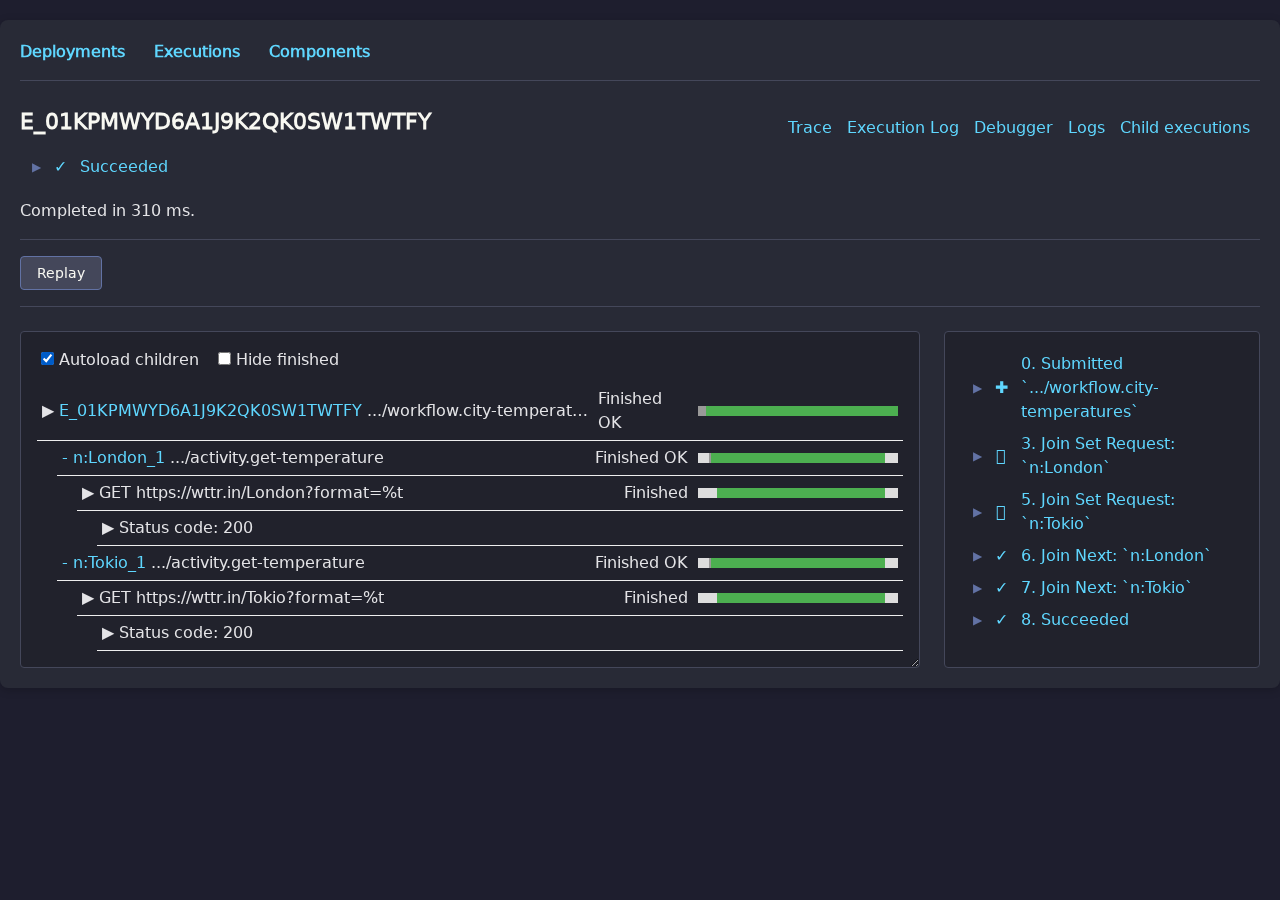
The resulting parallel execution is fully visible in the Web UI trace view:
And a webhook that accepts a list of cities, kicks off the workflow asynchronously, and returns the execution ID immediately:
// ffqn: myapp:weather/webhook.handle
export default async function handle(request) {
  const { cities } = await request.json();
  const execId = obelisk.executionIdGenerate();
  obelisk.schedule(execId, "myapp:weather/workflow.city-temperatures", [cities]);
  return Response.json({ execId }, { status: 202 });
}
The deployment entry declares the route:
[[webhook_endpoint_js]]
name     = "weather_webhook"
location = "./webhook/weather.js"
routes   = [{ methods = ["POST"], route = "/weather" }]
Callers get the execution ID back immediately and can poll for the result:
curl -s -X POST http://localhost:9090/weather \
  -H "content-type: application/json" \
  -d '{"cities":["London","Tokyo"]}'
# → {"execId":"..."}
Determinism without restrictions
Workflow determinism is enforced by Obelisk rather than restricted by the runtime. Math.random()
and Date.now() are both safe to call in workflow code — their values are recorded in the execution
log on first call and replayed identically on crash-recovery.
Sandbox
JS components run under the same Wasmtime sandbox that powers all other Obelisk components. Rather than bundling a JS engine into the Obelisk binary, there are three slim WASM runtimes — one each for activities, workflows, and webhook endpoints — that are downloaded from Docker Hub on first use. Each runtime embeds Boa, a JS engine written in Rust, and Obelisk injects the JS source into it at execution time. No compilation step is needed, and the Obelisk binary itself stays small.
Because the runtimes are ordinary WASM components, the same fine-grained controls apply to JS and Rust/Go components alike:
- Allowed HTTP endpoints — outbound requests are restricted to explicitly listed host patterns and HTTP methods; any other request is rejected at the runtime level.
- Token-based HTTP secrets — short-lived tokens can be injected as
Authorizationheaders for specific hosts; secret values never appear in application logs or in the execution log database. - Environment variables — only explicitly declared keys are visible to the component; the host environment is not leaked.
OCI Distribution
JS components can be pushed to and pulled from any OCI registry. Obelisk embeds the full component
configuration — allowed hosts, environment variable declarations, secrets, and WIT types — as OCI
image manifest annotations. This means obelisk component add can reconstruct the complete
deployment entry automatically when you pull a component:
# Push a JS activity to an OCI registry (config is embedded in the manifest)
obelisk component push --name my_activity --deployment deployment.toml \
  oci://docker.io/myorg/my-activity:v1.0.0

# Pull and add it — allowed hosts, env vars, and secrets are restored automatically
obelisk component add oci://docker.io/myorg/my-activity:v1.0.0 \
  --name my_activity --deployment deployment.toml --locked
This replaces the gh:// GitHub release scheme that was introduced in 0.35 and has now been
removed. OCI registries are a better fit: they support content-addressable storage, access control,
and the embedded metadata makes components fully self-describing — the manifest annotations encode
the allowed HTTP host patterns and methods, environment variable names, secret token bindings, WIT
parameter and return types, and retry policy, so a freshly cloned deployment can be reproduced
exactly with a single component add.
Debugger with Sources and Stack Traces
For JS workflows and webhook endpoints, Obelisk attaches a JS stack trace to every event it records in the execution log — not just on errors, but on every interaction: submitting a child execution, awaiting a join set, scheduling a delay, and so on. The Web UI debugger uses these traces to let you step through any execution — in-progress or already finished — and see exactly which line of your code triggered each event:
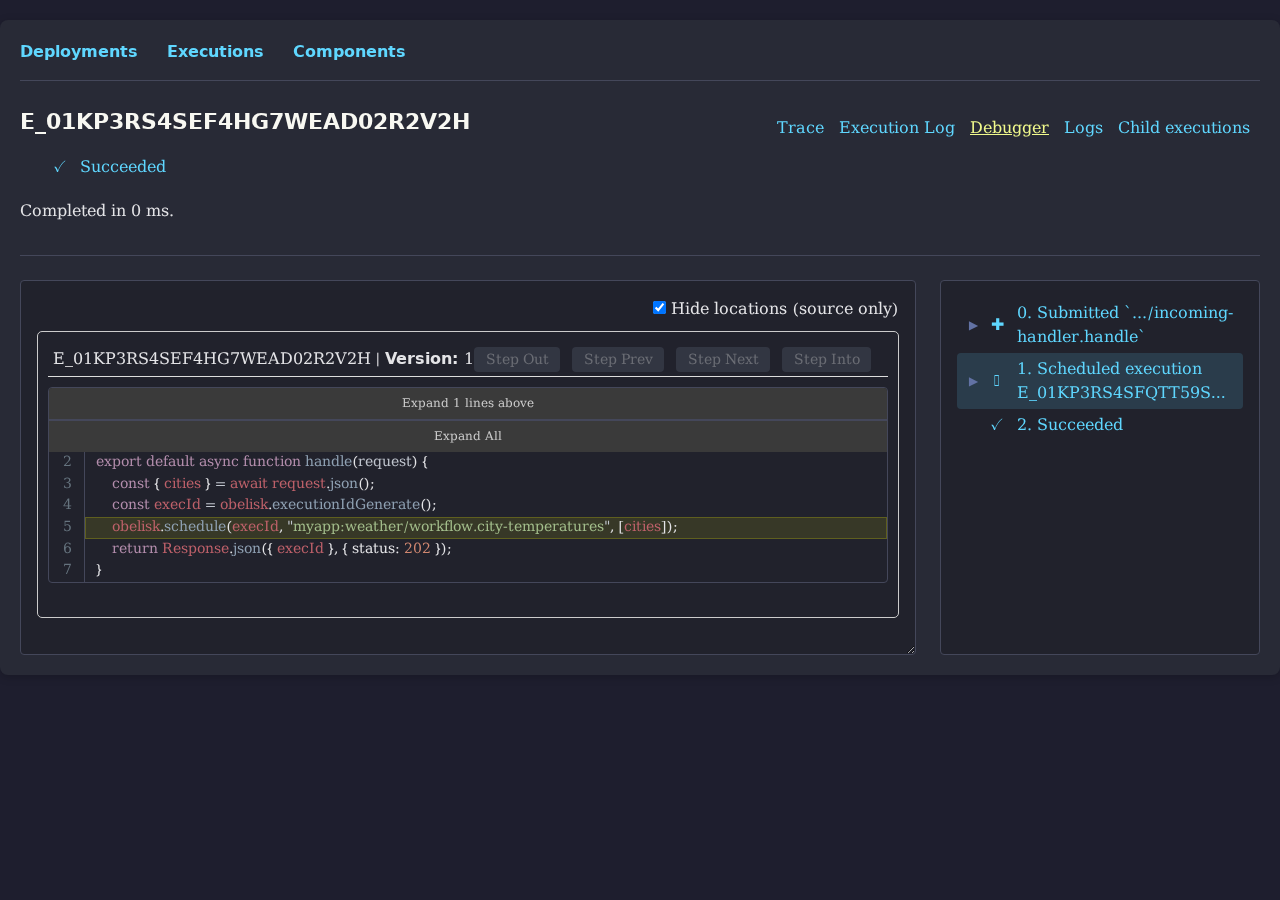
This brings JS on par with WASM components, where step-through debugging was already possible. The
difference is that WASM components require a separate source configuration to enable it, whereas JS
components need no extra setup — the same .js file that runs the execution is also what the
debugger shows. Because it is stored inside the database, the debugger always shows the code that
was actually running at the time, even after you have deployed a newer version.
Deployments
A Deployment is the new first-class concept for managing your component configuration. Every
time you push a deployment.toml to the server, Obelisk stores it as a versioned Deployment record
containing the complete configuration — component locations, retry settings, cron schedules, and
(for JS components) the full JS source.
obelisk deployment submit deployment.toml   # store; print the new Deployment ID
obelisk deployment apply  deployment.toml   # store + hot-redeploy immediately
obelisk deployment list                     # list deployments and their status
Every execution carries a reference to the Deployment that was active when it ran. This makes it possible to filter executions by deployment, replay them against the exact component version that originally handled them, and understand what changed between versions.
See the Deployments concept page for the full lifecycle, status transitions, and API reference.
Hot Redeploy
Hot redeploy activates a new deployment without restarting the server:
obelisk deployment apply deployment.tomlThe behavior is precise per component type:
- Activities — pending executions are picked up by the new workers immediately.
- Workflows — in-flight executions remain associated with the old component digest and become pending; an explicit upgrade migrates them to the new version.
- Webhooks — existing TCP connections continue on the old deployment; new connections use the new one.
Cron
Cron tasks let you trigger a function on a repeating schedule directly from your deployment.toml:
[[cron]]
name     = "daily-cleanup"
ffqn     = "myapp:tasks/jobs.daily-cleanup"
params   = '["archive", 30]'
schedule = "@daily"
The schedule field accepts standard five-field cron expressions (*/5 * * * *) or named
shorthands: @hourly, @daily, @weekly, @monthly, @yearly. The special value @once submits
the function once when the deployment becomes active and is useful for one-time migration tasks.
Cron schedulers are implemented as durable internal workflows — they survive server restarts and crashes without missing ticks. On hot redeploy, an unchanged cron entry is reused as-is: the existing seed execution continues from where it left off, so the function does not fire again prematurely.
See the Cron concept page for the full schedule syntax and operational details.
Full Changelog
For the complete list of changes, see the CHANGELOG.