Obelisk 0.38: Exec Activities, Step-Through Debugging, Self-Contained Deployments
Obelisk 0.38 adds native executable activities, step-through execution debugging with the
replay/advance API, and self-contained deployments where JS and shell scripts live directly inside
deployment.toml.
Since the 0.37 announcement, releases 0.37.x through 0.38 have added significant new capabilities on top of the JavaScript and Deployment foundation.
Exec Activities
Obelisk 0.37 introduced JavaScript as a lightweight alternative to compiled WASM components. 0.38 goes further: any executable (a shell script, a Python script, a Docker command) can now be a durable activity with the same retry, timeout, and observability guarantees as WASM and JS components.
The demo-tutorial app can be extended with an exec activity that calls an external tool. Here is a greeting activity implemented as a Bash script:
[[activity_exec]]
ffqn = "tutorial:tools/shell.greet"
content = '''#!/usr/bin/env bash
set -euo pipefail
NAME=$(echo "$1" | jq -r '.')
echo "\"Hello, ${NAME}!\""
'''
params = [{ name = "name", type = "string" }]
return_type = "result<string, string>"
env_vars = ["PATH"]
max_retries = 5
retry_exp_backoff.milliseconds = 100
The child process receives each parameter as a JSON-encoded positional argument and writes a
JSON-encoded return value to stdout. Exit code 0 means success, non-zero means error. Both stdout
and stderr are streamed and persisted, viewable via obelisk execution logs, the REST API, and the
Web UI.
Because of this addition, the more limited preopened-directory and process API has been removed from WASM activities. Exec activities are a better fit for interacting with the host system.
Secrets
Exec activities support secrets that are resolved at startup and piped to stdin as JSON. The child process reads them without the values ever appearing in the execution log:
[[activity_exec]]
ffqn = "myapp:ops/deploy.run"
content = '''#!/usr/bin/env bash
set -euo pipefail
TOKEN=$(jq -r .DEPLOY_TOKEN < /dev/stdin)
curl -sf -H "Authorization: Bearer $TOKEN" https://api.example.com/deploy -d "$1"
'''
params = [{ name = "payload", type = "string" }]
return_type = "result"
env_vars = ["PATH"]

[activity_exec.secrets]
env_vars = [{ name = "DEPLOY_TOKEN", value = "${HOST_DEPLOY_TOKEN}" }]
See Configuration for all
activity_exec fields.
Idiomatic JavaScript
0.38 makes JS components feel more natural with import-based function calls. Instead of calling functions by FFQN string, you import them directly:
// Before (0.37): call by FFQN string
const result = obelisk.call("tutorial:demo/activity.step", [i, i * 200]);

// After (0.38): direct import
import { step } from "tutorial:demo/activity";
const result = step(i, i * 200);
Namespace imports, schedule imports, stub imports, and extension imports are all supported:
import * as activity from "tutorial:demo/activity"; // namespace
import { stepSchedule } from "tutorial:demo-obelisk-schedule/activity"; // schedule (returns execution ID)
import { stepSubmit, stepAwaitNext } from "tutorial:demo-obelisk-ext/activity"; // join set extensions
Other additions: obelisk.executionIdCurrent() returns the current execution's ID, and
obelisk.sleep({ seconds: 5, name: "wait-for-deploy" }) attaches a label visible in traces.
See the JS Workflows and JS Webhooks docs for the full reference.
Self-Contained Deployments
With 0.37, JS components required separate .js files referenced via location. In 0.38, both
JavaScript components and exec activities support inline content, so a complete application can
live in a single deployment.toml.
Here is the demo-tutorial rewritten as a self-contained deployment: an activity, a workflow that calls it, and a webhook that triggers everything, all in one file:
[[activity_js]]
ffqn = "tutorial:demo/activity.step"
params = [
  { name = "idx", type = "u32" },
  { name = "sleep-millis", type = "u32" },
]
return_type = "result<u32>"
exec.lock_expiry.seconds = 10
content = '''
export default async function step(idx, sleep_millis) {
    console.log(`Step ${idx} started`);
    await new Promise(r => setTimeout(r, sleep_millis));
    console.log(`Step ${idx} completed`);
    return idx;
}
'''

[[workflow_js]]
ffqn = "tutorial:demo/workflow.serial"
return_type = "result<u32, string>"
content = '''
import { step } from "tutorial:demo/activity";

export default function serial() {
    let acc = 0;
    for (let i = 0; i < 10; i++) {
        obelisk.sleep({ seconds: 1 });
        acc += step(i, i * 200);
    }
    return acc;
}
'''

[[webhook_endpoint_js]]
name = "tutorial"
routes = ["/*"]
content = '''
import { serial } from "tutorial:demo/workflow";

export default function handle(request) {
    const url = new URL(request.url);
    const headers = { "x-obelisk-execution-id": obelisk.executionIdCurrent() };
    if (url.pathname === "/serial") {
        const result = serial();
        return new Response(`serial completed: ${result}`, { status: 200, headers });
    }
    return new Response("not found\ntry /serial", { status: 404, headers });
}
'''
Run it with a single command:
obelisk server run --deployment deployment.toml
curl http://localhost:9090/serial
The same inline content works for exec activities, so you can mix JavaScript workflows with shell
script activities in one file:
[[activity_exec]]
ffqn = "tutorial:tools/shell.system-info"
return_type = "result<string>"
env_vars = ["PATH"]
content = '''#!/usr/bin/env bash
echo "\"$(uname -s) $(uname -m)\""
'''

[[workflow_js]]
ffqn = "tutorial:tools/workflow.check-system"
return_type = "result<string, string>"
content = '''
import { systemInfo } from "tutorial:tools/shell";

export default function checkSystem() {
    const info = systemInfo();
    console.log(`Running on: ${info}`);
    return info;
}
'''
When location is used with a local file path, the file is read at deploy time and converted to
embedded content, making every deployment self-contained by default.
Step-Through Debugging
Obelisk 0.38 introduces Replay and Advance, operations that let you step through a workflow execution event by event. Submit an execution as paused, then inspect its events, child executions, and logs at any point. When you advance, the modal shows exactly what will be written to the execution log (new child executions, delay requests, and completions) together with stack traces linked to the source code.
The Web UI provides Replay and Advance buttons directly on the execution detail page, alongside controls for pausing, unpausing, and upgrading the component:
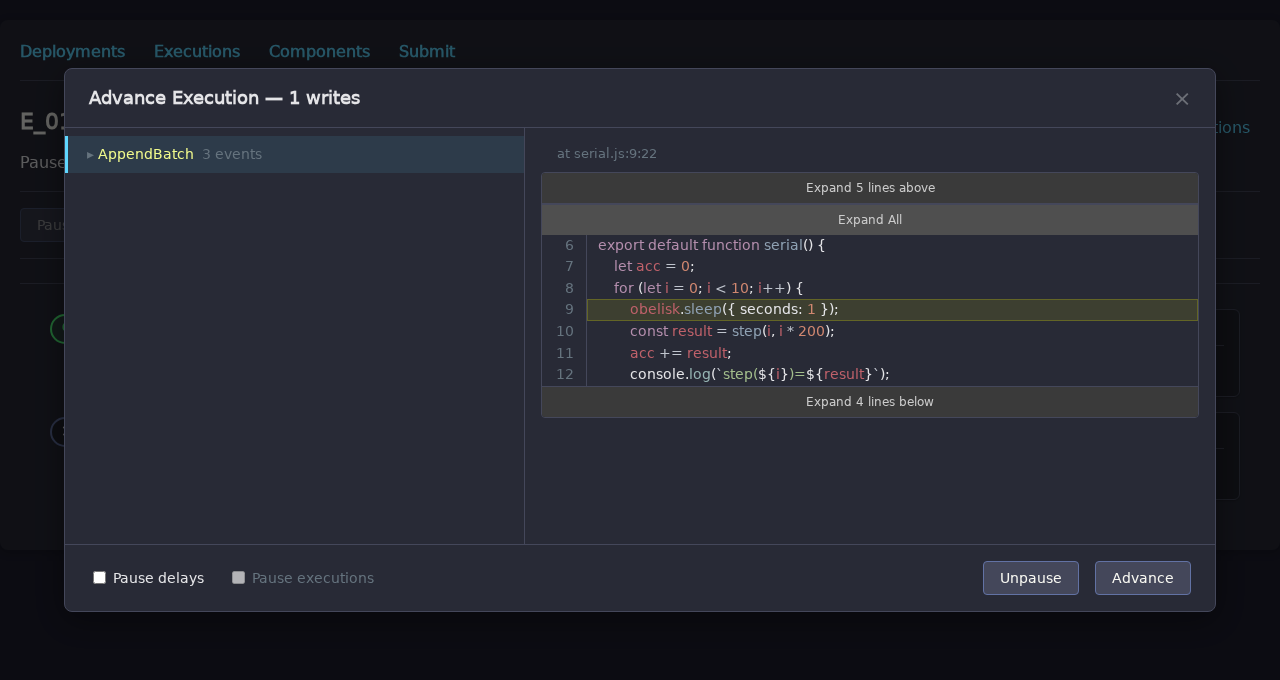
Advance supports fine-grained control: pause child executions or delays as they are created, trim
writes to limit child execution creation. The same operations are available via the CLI
(obelisk execution replay / obelisk execution advance) and the REST API.
A follow-up blog post will explore step-through debugging in detail with a real-world example.
Full Changelog
For the complete list of changes, see the CHANGELOG.