Workflows
Workflows are the core of Obelisk's functionality, allowing you to define functions that orchestrate your application's processes by spawning sequences of child executions – such as activities or other workflows. Obelisk takes responsibility for managing the reliable execution of these sequences, handling factors like retries, and timeouts to ensure the entire process completes correctly, even in the face of interruptions like server restarts.
Determinism and Replayability
This reliability is fundamentally enabled by ensuring deterministic execution and thus replayability. Workflows run within a WASM sandbox, guaranteeing that given the same inputs and event history, the workflow logic will always produce the exact same outputs and sequence of operations. To support this, Obelisk persistently records every child execution submission and its eventual result, forming a durable execution log. This log allows a workflow's state to be precisely reconstructed and resumed after any interruption, ensuring it can reliably continue from where it left off without duplicating or skipping steps.
A direct consequence of determinism is that a workflow must not read anything that could differ between the original run and a replay. In particular, JavaScript and Rust workflows cannot read environment variables or other ambient host state. Supply runtime configuration as workflow parameters instead: a component that can read the environment (a webhook, an activity, or a parent execution) reads the value and passes it in when it schedules or calls the workflow, so the value is recorded in the execution log and replays identically.
How Workflows Are Executed in Obelisk
- The Obelisk runtime instantiates the WASM component and calls the requested workflow function.
- When the workflow needs to start a child execution, it makes a request to store its FFQN and parameters.
- The Obelisk runtime schedules the activity or a child workflow for execution in the background.
- The child execution runs, performs its work, and returns a result to the workflow. Obelisk handles retries on errors and timeouts for activities.
- The workflow continues processing. This may involve replaying the state form its execution log.
- Completion/Failure: The workflow continues until it either completes successfully or encounters an unrecoverable error. The final state of the workflow is recorded.
Defining workflow functions in WIT
As with all components in Obelisk, the
WIT interface definition language is
used to describe each workflow function. Since workflows can fail when the function invocation
traps (panics), each function must be fallible. This means that the return type must be one of
following:
resultresult<T>whereTrepresents any successful variant likestringorlist<u32>or even a none type (_)result<T, string>result<T, E>whereEis avarianttype that containsexecution-failedvariant.
Developing a Workflow in Rust
Creating a workflow
Continuing the fibonacci example from activities page, let's generate the workflow in Rust. The demo-tutorial Rust workflow is a complete buildable example. This fibonacci example uses the following layout:
.
├── Cargo.toml
├── obelisk.toml
├── README.md
├── rust-toolchain.toml
├── src
│   └── lib.rs
└── wit
    ├── deps
    │   ├── obelisk_types@6.0.0
    │   │   └── types.wit
    │   ├── obelisk_workflow@7.0.0
    │   │   └── workflow-support.wit
    │   ├── template-fibo_activity
    │   │   └── fibo-activity.wit                   # Imported activity
    │   ├── template-fibo_activity-obelisk-ext
    │   │   └── activity-obelisk-ext.wit            # Generated -ext import
    │   └── template-fibo_workflow
    │       └── fibo-workflow.wit                   # Exported interface
    ├── impl.wit                                    # World (imports and exports)
    ├── template-fibo_workflow-obelisk-ext
    │   └── workflow-obelisk-ext.wit                # Generated -ext interface of exports
    └── template-fibo_workflow-obelisk-schedule
        └── workflow-obelisk-schedule.wit           # Generated -schedule interface of exports
Synchronously Calling an Activity
First we need to define and export the workflow interface with the function signature in WIT format. We also need to import the activity interface.
fibo-activity.wit:
package template-fibo:activity;

interface fibo-activity-ifc {
    fibo-activity: func(n: u8) -> result<u64>;
}
fibo-workflow.wit (simplified):
package template-fibo:workflow;

interface fibo-workflow-ifc {
    fiboa: func(n: u8, iterations: u32) -> result<u64>;
}
impl.wit (simplified):
package any:any;

world any {
    export template-fibo:workflow/fibo-workflow-ifc;
    import template-fibo:activity/fibo-activity-ifc;
}
Implementing the workflow is straight forward. In Rust, the interface will be turned into Guest
trait by wit-bindgen. Bindings for the imported interfaces
will be generated as well.
impl Guest for Component {
    fn fiboa(n: u8, iterations: u32) -> Result<u64, ()> {
        let mut last = 0;
        for _ in 0..iterations {
            // This line will pause the workflow,
            // submit new activity execution and wait for the result.
            last = fibo_activity(n).unwrap();
        }
        Ok(last)
    }
}
The generated deployment.toml already includes the fibo activity and the workflow:
[[activity_wasm]]
name = "activity_myfibo"
# ...

[[workflow_wasm]]
name = "myworkflow"
location = "target/wasm32-unknown-unknown/release/myworkflow.wasm"
Let's build the WASM Component and run Obelisk.
cargo build --release
obelisk server run --app-config app.toml --deployment deployment.toml
In another terminal, let's list all the exported functions:
obelisk component listExpected output:
myworkflow      workflow:myworkflow
Exports:
        template-fibo:workflow/fibo-workflow-ifc.fiboa : func(n: u8, iterations: u32) -> result<u64>
        template-fibo:workflow/fibo-workflow-ifc.fiboa-concurrent : func(n: u8, iterations: u32) -> result<u64>

activity_myfibo activity_wasm:activity_myfibo
Exports:
        template-fibo:activity/fibo-activity-ifc.fibo : func(n: u8) -> result<u64>
We can run the fiboa workflow using CLI:
obelisk execution submit --follow \
    template-fibo:workflow/fibo-workflow-ifc.fiboa [40,10]
or using the WebUI:  The result
shows that
The result
shows that fibo activities were indeed executed sequentially: 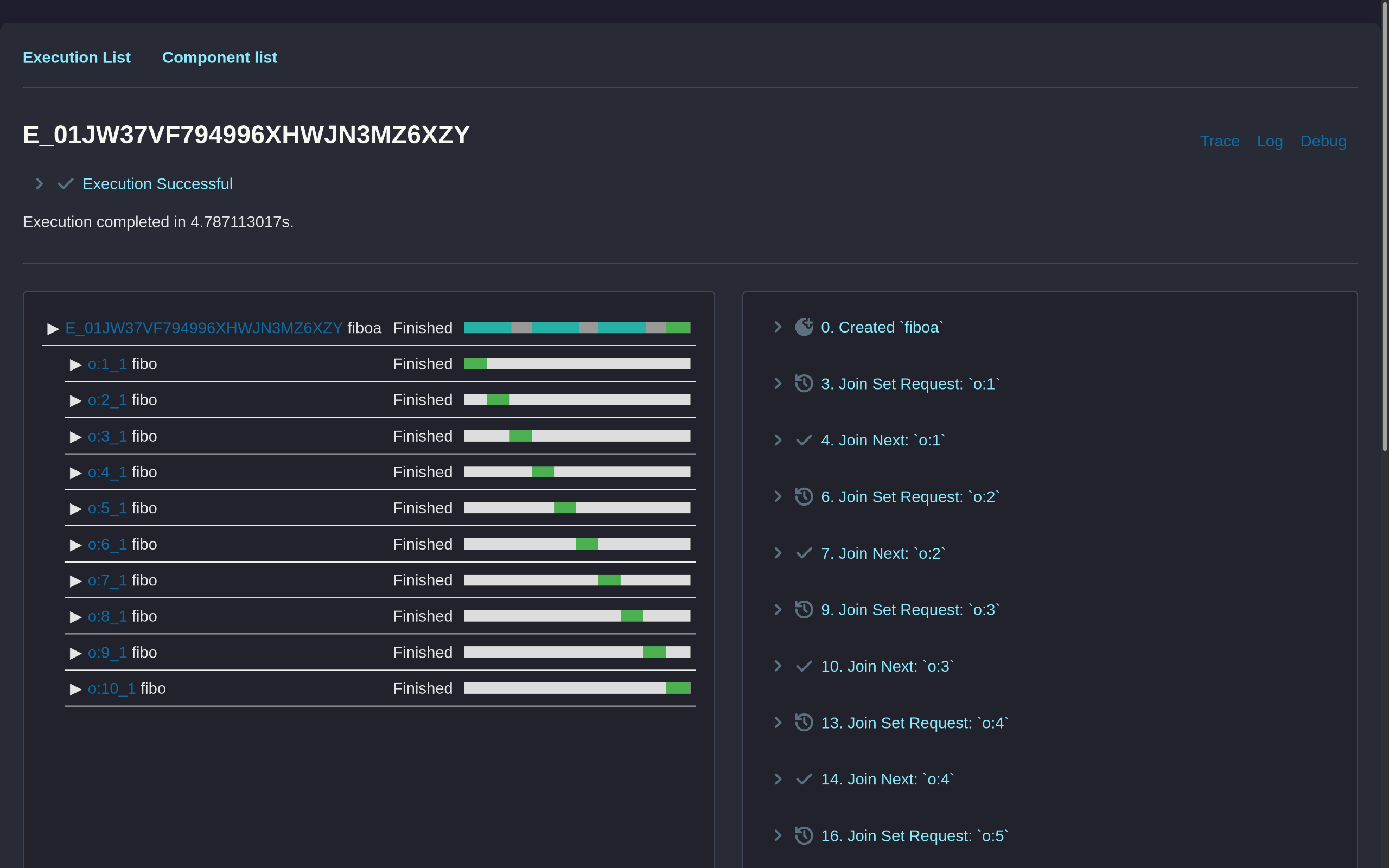
See Getting Started (Rust / WASM) for building and deploying a Rust workflow.
Concurrently submitting multiple child executions
Using the same activity WIT, let's now submit all executions concurrently and then await their results:
Extended Activity WIT
Obelisk can generate several helper functions for every exported activity or workflow function. See Extension Functions for details.
// Generated by Obelisk
package template-fibo:activity-obelisk-ext;

interface fibo-activity-ifc {
  use obelisk:types/execution@6.0.0.{execution-id, await-next-extension-error, get-extension-error, child-execution-request-error};
  use obelisk:types/join-set@6.0.0.{join-set};

  fibo-submit: func(join-set: borrow<join-set>, n: u8) -> result<execution-id, child-execution-request-error>;

  fibo-await-next: func(join-set: borrow<join-set>) -> result<tuple<execution-id, result<u64>>, await-next-extension-error>;

  fibo-get: func(execution-id: execution-id) -> result<result<u64>, get-extension-error>;
}
Workflow WIT
Let's add a new function signature to the exported interface:
package template-fibo:workflow;

interface fibo-workflow-ifc {
    fiboa: func(n: u8, iterations: u32) -> result<u64>;
    fiboa-concurrent: func(n: u8, iterations: u32) -> result<u64>; // Added
}
Workflow implementation
fn fiboa_concurrent(n: u8, iterations: u32) -> Result<u64, ()> {
    let join_set = join_set_create();
    for _ in 0..iterations {
        fibo_submit(&join_set, n);
    }
    let mut last = 0;
    for _ in 0..iterations {
        last = fibo_await_next(&join_set).unwrap().unwrap();
    }
    Ok(last)
}
First, we must explicitly instantiate a Join Set. While synchronous calls also involve a join set, Obelisk creates it automatically in that scenario; here, manual creation is required.
Next, we call the -submit extension function. This action persists the execution request to the
database, queuing it for processing. An assigned executor will then pick up this task and run the
child execution to completion. Importantly, the parent workflow is not blocked and can continue
submitting other child executions while this happens.
To retrieve results, call the -await-next extension function. This function will block if no child
executions have finished. As the name implies, -await-next returns results based on completion
order, not submission order – whichever child execution finishes first provides the next result.
Running the fiboa-concurrent produces the expected trace:

The stargazers demo repository contains code examples demonstrating both synchronous (blocking) and concurrent submission of activities and sub-workflows within a workflow.
Scheduling child executions
The -schedule extension function is
suitable when the workflow either doesn't require the result of the submitted execution or needs to
defer its execution to a future time. Importantly, join sets are not used for scheduled executions,
as this method bypasses the
structured concurrency
principles.
fn schedule_child(n: u8)  {
    let duration=...
    fibo_schedule(ScheduleAt::In(duration), n);
}
Logging and debugging
To understand the internal state of a workflow, you can use the following:
- Read the execution log. It contains workflow parameters, each child execution and the final result. Execution log is available in the web UI.
printfstyle debugging: enableforward_stdoutorforward_stderrin the[[workflow]]section of the configuration. By default, output is stored in the database and available in the Web UI. It can also be forwarded to"stdout"or"stderr"to appear in the server log.obelisk:logAPI - see Runtime Support
Adding print statements or logs is ignored by the execution log, so you can add it to an in-progress or a finished execution and trigger the replay.
Advanced Topics
Backtrace capture
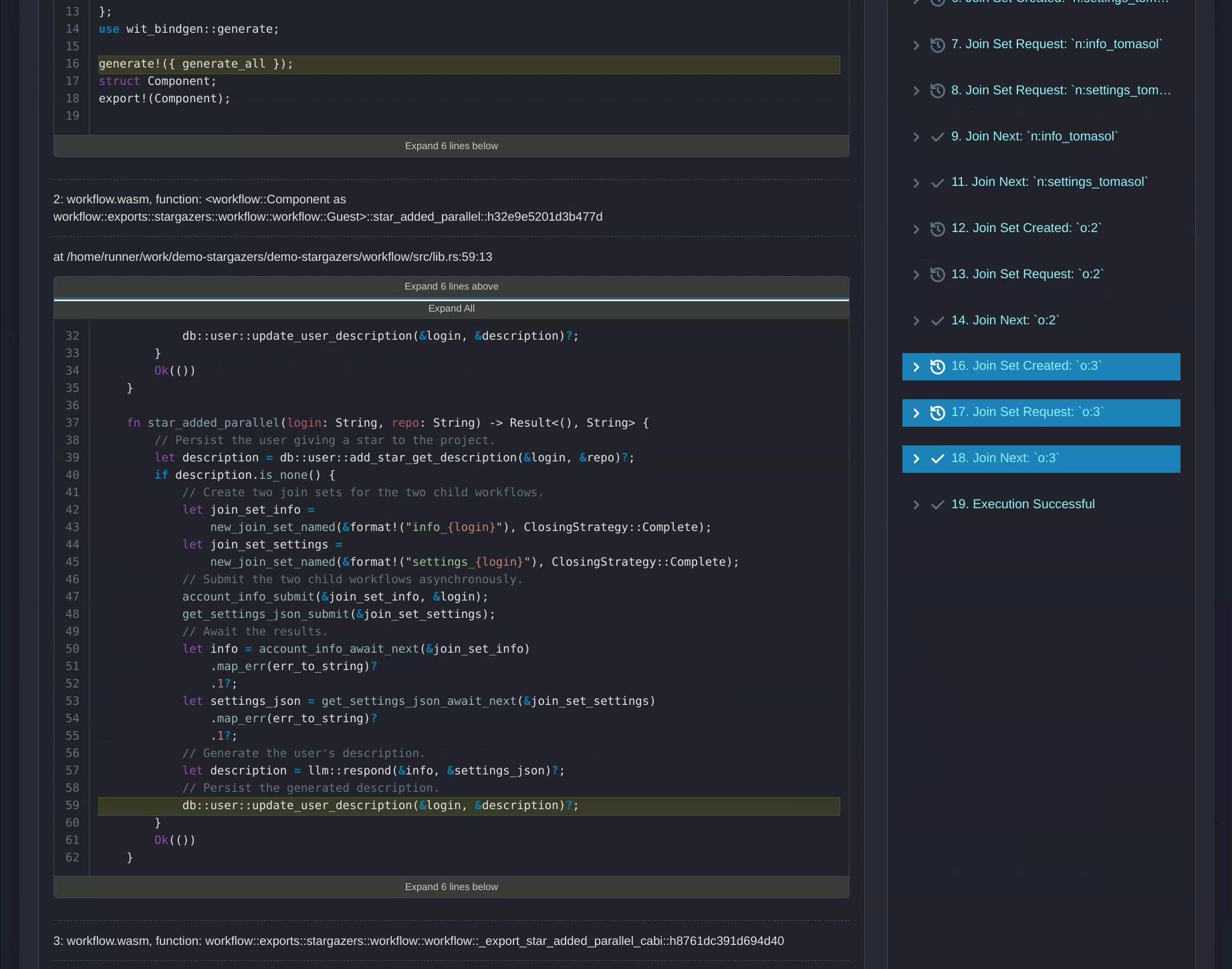
If we specify the backtrace.sources, the frontend can display source file and line for every
captured backtrace.
[[workflow]]
backtrace.sources = {".../src/lib.rs" = "workflow/src/lib.rs"}
The mapping is from frame source to local file system. When .../ is used, the frame source path is
matched based on the suffix, src/lib.rs in this example. Workflow backtraces are captured lazily
during user-issued replay and advance operations. To replay an execution and persist its call-site
backtraces, run:
obelisk execution persist-backtraces <execution-id>Join Next Blocking Strategy
You can control what happens to the runtime instance when a blocking call is awaited (e.g. in the
example above, when fibo_activity() is executed).
await- keep the instance waiting for the result, until the execution lock expires.interrupt- unload the instance from memory immediately.
For example, having the following configuration:
[[workflow_wasm]]
name = "myworkflow"
location = "target/wasm32-unknown-unknown/release/workflow.wasm"
exec.lock_expiry.seconds = 1
join_next_blocking_strategy = "await"
If the workflow instance calls an action right at the start, it will be kept hot for up to 1 second. If the activity finishes before the lock expires, the workflow instance will receive the result and continue.
On the other hand, if the activity result is delayed, the execution will be unloaded from memory. Once the activity finishes, it will mark the parent workflow as pending. The workflow executor will lock it again, fetch its execution log and replay all the steps that the execution went through.
If the interrupt strategy is selected, each call to an activity or
persistent sleep will trigger
locking the execution and replaying the execution log.